Electricity in Israel: Type H Sockets, European Plugs and Safe Charging
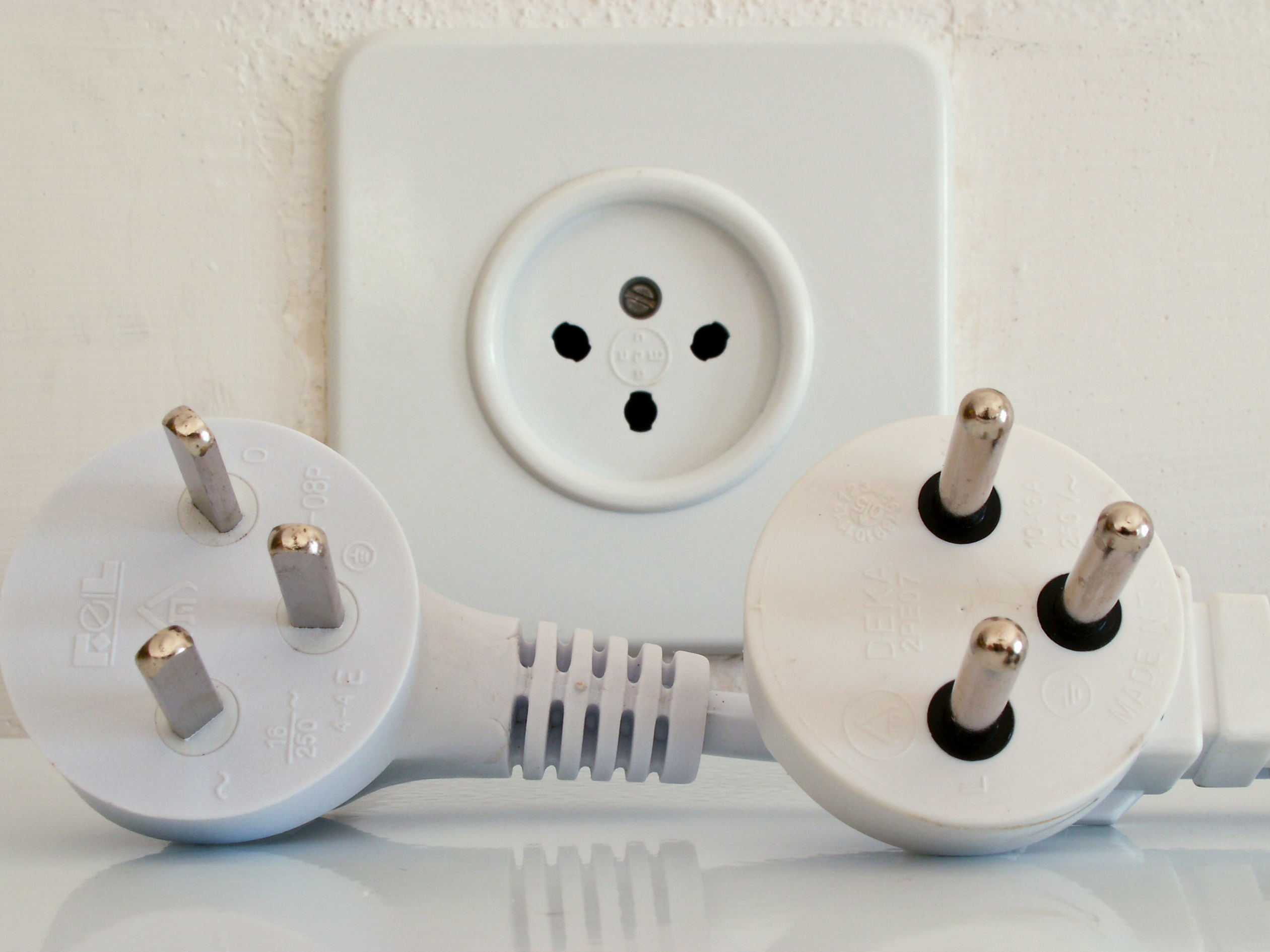
Israel uses 230V at 50Hz, with the local three-pin Type H socket. A slim European two-pin charger often connects directly to a compatible modern socket, but that does not make every European plug suitable. Visitors with North American, British or Australian equipment should check both the plug and the electrical rating before packing.
Recognising Type H
The modern Israeli Type H plug has three round pins in a triangular arrangement, including earth. Older flat-pin versions also exist, as the photograph shows. The ordinary modern socket is designed for the local system, not for every plug sold as international.
The slim two-round-pin Type C Europlug is generally compatible with modern Israeli sockets that accept it. A thick two-pin contour plug or earthed Schuko plug is a different shape and connection. Do not force either into a socket or assume that two round pins always mean the same fit.
230V and 50Hz: compare with your equipment
Israel’s normal household supply is 230V, 50Hz. Equipment rated only for 100V or 120V must not be connected through a simple shape adaptor: the higher voltage can damage it and create a hazard. Countries with similar voltage can still use different plugs.
Check the actual device or power supply rather than its country of purchase. For equipment with motors, clocks or other frequency-sensitive components, a voltage match alone is not enough; the manufacturer must support 50Hz too.
Israeli Type H plugs and a socket: the round-pin plug is on the right, with an older flat-pin version on the left. · Kiddo; corrected version: Marekich · Public domain · Unmodified


A slim Type C Europlug (a), thicker contour plug (b) and earthed European plug (c). They do not have identical socket compatibility. · SomnusDe; composite: MikeRun · CC BY-SA 3.0 · Unmodified

Read the input label
A phone or laptop charger marked INPUT 100–240V, 50/60Hz can normally use the local supply with the correct safe physical connection. Check every charger independently, including camera batteries, medical equipment and electric toothbrushes.
The USB OUTPUT label, such as 5V, 9V or 20V, describes what the charger delivers to your device. It does not identify the mains supply it accepts. Photograph the input labels before travelling so that you can confirm them without unpacking everything at the airport.
Which adaptor should you bring?
Choose an Israel-compatible Type H adaptor for your actual plug. British Type G, Australian Type I and North American A/B plugs need a suitable physical connection. If your device needs earth, select a genuinely earthed adaptor that preserves that protection through the local socket.
A universal-looking front with only two pins on the back does not supply earth. Never cut off a third pin, bend blades or use stacked adaptors to force a connection. Buy a reputable product and check its current and power rating as well as its shape.
Hairdryers, kettles and voltage converters
A travel adaptor does not convert voltage or frequency. A 120V-only hairdryer or straightener needs more than an adaptor, and high-power devices make converters bulky and easy to mismatch. Using a locally supplied appliance is usually simpler for a holiday.
If a dual-voltage appliance has a manual selector, set it to the manufacturer’s specified 220–240V mode before connecting. A necessary transformer must match the equipment and its power demand. Ask the manufacturer about any essential appliance rather than experimenting with an unsuitable converter.
Charging in a hotel or rented apartment
A quality multi-port USB charger rated for 230V can reduce the number of adaptors needed. Check the total power shared between ports if charging a laptop alongside phones. Bring a spare cable and one spare adaptor rather than depending on a single connection for every device.
Use a ventilated, dry surface. Avoid charging under bedding or close to sinks, and unplug damaged or unusually hot equipment. Ask the host about a loose or scorched socket rather than moving it or opening it. Check whether the room’s key-card switch turns off the socket when you leave.
Local appliances and unfamiliar switches
In an apartment, a labelled switch or timer may control equipment such as an electric water heater. Ask the host how the installed system is meant to be used rather than assuming the control is a light switch or leaving unfamiliar equipment running indefinitely.
Do not open an electrical panel, bypass a tripped breaker or connect a car charger to an ordinary outlet through a travel adaptor. For medical equipment requiring continuous power, confirm a suitable power arrangement and backup plan with the accommodation and equipment provider before booking.
Power failures and practical preparation
If the room loses power, contact the hotel or host and establish whether neighbouring rooms or buildings are affected. Keep a charged phone and a small light available; offline copies of your accommodation address and essential contacts are useful. Never touch a fallen cable or wet electrical equipment.
The Israel Electric Corporation’s service line is 103. Its current service website provides reporting and service information when available; a local host can help with the Hebrew interface and address details. During a wider emergency, follow official instructions and do not assume that a generator or backup supply serves every socket in the building.
Compare the total price, cancellation terms and location, and ask the property how tourist VAT eligibility is handled. This is a hotel search, not a claim that we stayed at every property listed. Explore Tel Aviv hotels on Trip.com
We may earn a commission on bookings through this link.